
The Automations Wall
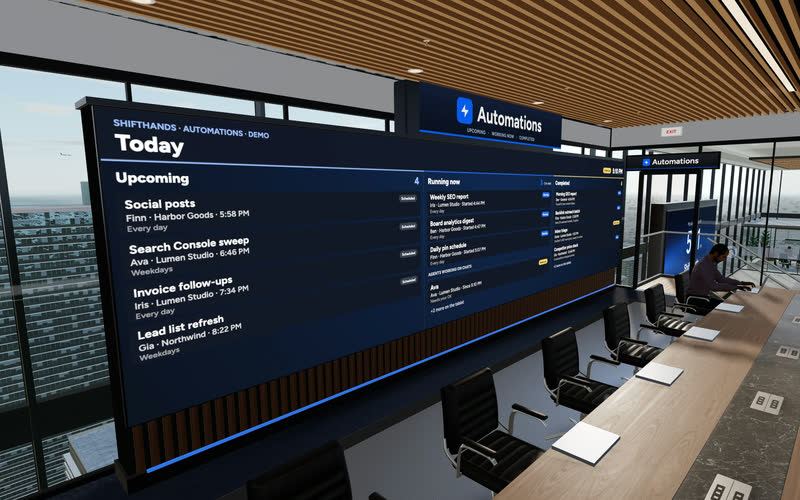
A big screen shows today’s Upcoming, Running now and Completed automations. Step up to the tablet to take a closer look at any run.
ShiftHands suits people who want project-based agents running on their Mac, with chats, scheduled results and supervision from a browser or phone. OpenClaw suits people who want a configurable self-hosted agent gateway across chat apps, computers and servers.
Engine disclosure: ShiftHands uses open-source Hermes Agent software by Nous Research under the MIT License. ShiftHands is a separate product that provides its own Mac app, project-based workspace and browser/phone interface. ShiftHands is not affiliated with or endorsed by Nous Research.
This comparison is published by ShiftHands, one of the products compared.
ShiftHands
Published this comparison
Project-based agent workspace on your Mac
OpenClaw
by the OpenClaw Foundation
Configurable self-hosted agent gateway
See it working
Click through the real app: projects down the side, a chat per agent, automations that report back, and a browser you can take over. The agents do the typing.
Recorded in the ShiftHands demo workspace.
Virtual Environment
Every ShiftHands plan, Free included, comes with the Virtual Environment: a 3D office in the app where your agents work at their desks, grouped by project. Walk over, pull up a chair, and watch your crew get it done.

A big screen shows today’s Upcoming, Running now and Completed automations. Step up to the tablet to take a closer look at any run.
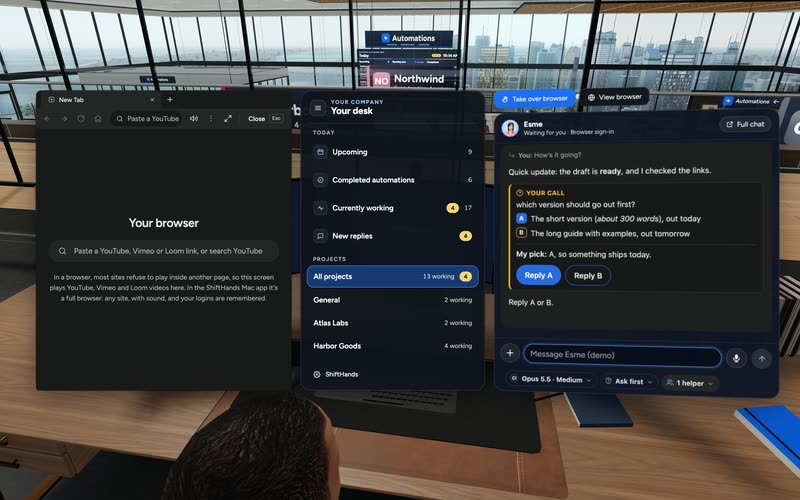
Sit down to see every project and every agent at a glance, and chat with anyone without leaving your chair.
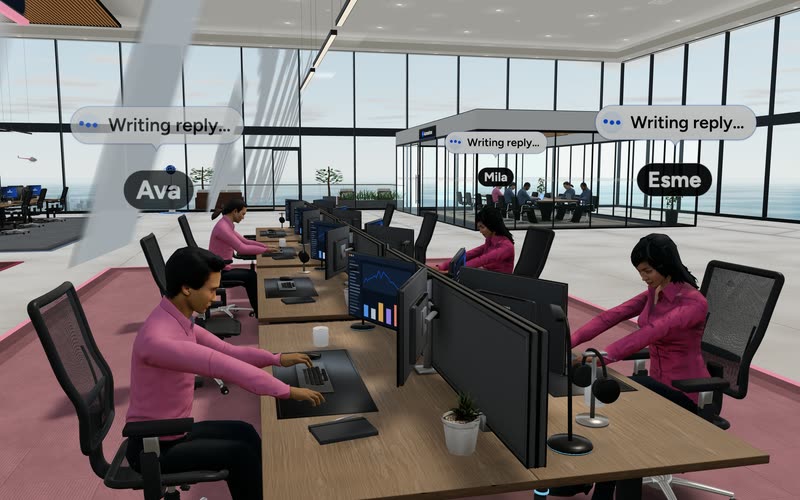
Every agent has a desk in its project area. Agents running an automation head to the Automations room. Walk up to any agent and chat.
Rendered in the ShiftHands demo workspace with made-up names. Open the Virtual Environment from the sidebar or from Chief of Staff in the app. Agents still run on your Mac and use your connected AI accounts.
Organized by what decides the choice. A pill shows availability or setup needed, not a score.
| Dimension | ShiftHands | OpenClaw |
|---|---|---|
| Product type | Project-based agent workspace: a Mac app plus a web app | Agent gateway platform you install and configure |
| Where agents run | On your Apple-silicon Mac | On the computer or server running the Gateway |
| Supported hosts | Mac only Apple silicon (M1 or newer), macOS 13 or later | Several macOS, Linux, Windows and servers; the macOS app needs macOS 15 or later |
| Installation and maintenance | Download the Mac app and sign in | You operate it Install the Gateway, then set up models, channels and clients |
| Agent organization | Projects, each with agents that keep their own chat, history and model | Isolated agents with their own workspace and sessions, routed by channel bindings |
| Parallel work | Agent teams run in parallel inside a project | Multi-agent routing in one Gateway, plus subagents |
| Messaging channels | App and browser Mac app and web app; no chat-app channels | Chat apps WhatsApp, Telegram, Discord, Slack, Signal, iMessage and more |
| Browser dashboard and phone | Supervise and reply from any browser, including a phone | Browser Control UI, a macOS menu bar app, and iOS and Android apps |
| Scheduled work | Automations post a result card in the agent's chat | Scheduled jobs and webhooks; output goes to a chat channel, a webhook or nowhere |
| Execution approvals | Settings-dependent Flagged commands wait for Allow once or Deny | Configurable Exec approval policies and allowlists, per agent |
| Gateway and access security | Agents run on your Mac; other devices supervise through a browser | Gateway binds to loopback by default; sender pairing, allowlists, optional sandboxing |
| Browser/computer use | Needs Ego Lite A free agent browser from Citro Labs, installed separately | A managed browser profile for agents, or attach to your signed-in browser |
| Models and providers | Claude via Claude Code, ChatGPT via Codex; DeepSeek, GLM, Kimi, Qwen by API key | Many providers through plugins, including ChatGPT/Codex sign-in and API keys, with fallbacks |
| Free offering | Free plan 25 messages a day, 1 project, 3 agents, 2 daily automations | Free software No usage limits set by OpenClaw itself |
| Paid costs | Pro $49.99/month or $499/year, bought in the Mac app | No paid OpenClaw tier; model and hosting costs only |
Facts come from each product's own site and documentation, read on October 16, 2026. We compared documented features; we did not run hands-on tests.
Both products run several agents and let you step in. The difference is where you hand over work, how agents are organized and where you check the result.
ShiftHands
You message an agent inside a project, from the Mac app or any browser.
OpenClaw
You message an agent from a chat app, the Control UI, the terminal or a desktop or mobile app.
ShiftHands
In the project. Each agent keeps its own chat, history and model.
OpenClaw
In each agent's own workspace, state directory and session history.
ShiftHands
You run agent teams in parallel inside a project.
OpenClaw
Several isolated agents share one Gateway. Bindings route each incoming message to the right agent.
ShiftHands
It flags a command for Allow once or Deny, or you take over its browser.
OpenClaw
Exec approvals prompt you when policy requires it, including in the Control UI and mobile apps.
ShiftHands
In the agent's chat, where automations post a result card.
OpenClaw
In the chat or channel where you talk to the agent, or wherever a scheduled job delivers.
Both run on hardware you control. ShiftHands packages everything in a Mac app. OpenClaw gives you a Gateway to install, configure and keep running.
ShiftHands
OpenClaw
To see what your Mac needs for ShiftHands, read where ShiftHands agents run.
OpenClaw is built to meet you in the chat apps you already use. ShiftHands keeps agents in its own workspace, which you open in the Mac app or any browser.
ShiftHands
OpenClaw
Both support scheduled work and configurable command approvals. ShiftHands can hold flagged commands for your decision; OpenClaw uses execution approval policies and allowlists. In either product, behaviour depends on settings.
ShiftHands
OpenClaw
Neither product is safer by default. Safety depends on how each one is configured and what agents can reach.
Both let agents use a browser. ShiftHands is built around watching an agent's browser and taking over; OpenClaw documents managed browser tools.
ShiftHands
OpenClaw
Both use AI accounts you connect, so your provider's plan, charges and limits apply. The software costs differ, and OpenClaw can add hosting costs if you run it on a server.
ShiftHands
from $0/month
OpenClaw
$0 software
Free software does not mean zero running cost, and neither product includes unlimited model use. See ShiftHands pricing.
Trade-off Not a fit if you need chat-app channels, Windows, Linux, Intel Mac or server hosting, or agents running while your Mac is off.
OpenClaw may be the better fit if you want to control your agent gateway and work through the messaging apps you already use. It supports multiple isolated agents, persistent sessions, scheduled jobs, browser tools and remote hosting, with a Control UI and clients for supported desktop and mobile platforms.
Choose OpenClaw if WhatsApp, Telegram, Discord, Slack or other messaging channels are central to your workflow, or if you need Windows, Linux, Intel Mac or server hosting. You also get broader gateway configuration, model-provider options and plugin extensibility.
Trade-off You configure and maintain the Gateway, models, channels, permissions and any hosting yourself. OpenClaw's software is free, but provider and infrastructure costs remain separate.
Still exploring other options? See OpenClaw alternatives for a broader shortlist of self-hosted and managed AI agents.
OpenClaw does: its Gateway runs on macOS, Linux and Windows. ShiftHands agents need an Apple-silicon Mac, though you can supervise them from a Windows browser.
OpenClaw is free, MIT-licensed software with no paid tier. ShiftHands has a free plan with 25 agent messages a day, 1 project and 3 agents, and Pro costs $49.99 a month. AI-provider costs are separate on both.
With OpenClaw, yes: it connects agents to WhatsApp, Telegram, Discord, Slack and other chat apps. ShiftHands has no chat-app channels; you use its Mac app or a browser.
ShiftHands holds flagged commands for Allow once or Deny, depending on agent settings. OpenClaw uses configurable exec approval policies and allowlists, and can prompt you in the Control UI or its mobile apps.
Yes. ShiftHands works in any phone browser while your Mac stays on. OpenClaw reaches you through chat apps, the Control UI and its iOS and Android apps, and its Gateway can run on a remote server.
Both. ShiftHands agents browse in Ego Lite, where you can watch and take over. OpenClaw gives agents a managed browser profile or attaches to your signed-in browser.
ShiftHands signs in with Claude through Claude Code or ChatGPT through Codex. OpenClaw supports ChatGPT/Codex sign-in and API keys for Anthropic and many other providers.
Agents move into project chats in a Mac app, supervised from a browser. You give up chat-app channels and Linux, Windows or server hosting, and you need an Apple-silicon Mac that stays on.
ShiftHands facts: ShiftHands homepage, pricing, download page and Mac requirements, checked October 16, 2026.
OpenClaw facts: OpenClaw site, documentation, platforms, macOS app, iOS app, Control UI, multi-agent routing, automations, exec approvals, security, browser and model providers, read October 16, 2026.
This comparison is published by ShiftHands, one of the products compared. Product names belong to their owners. It compares documented features; we did not run hands-on tests. Facts and prices were checked on each product's own site on October 16, 2026 and can change. ShiftHands is not affiliated with or endorsed by the OpenClaw Foundation.