

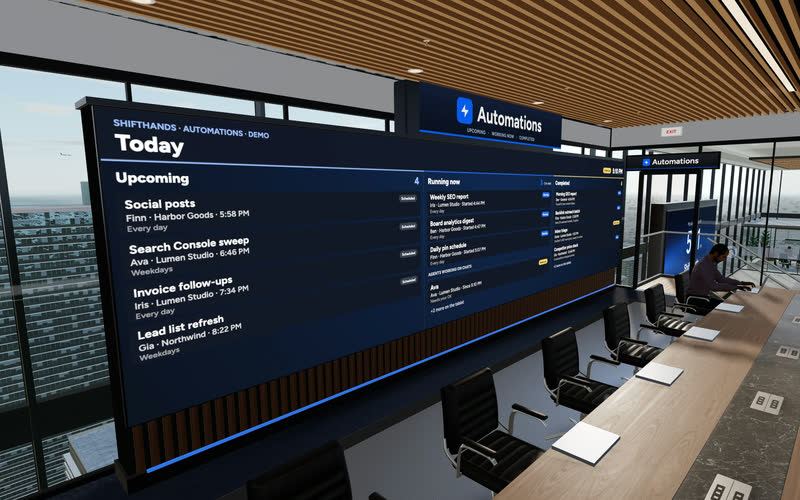
The Automations Wall
A big screen shows today’s Upcoming, Running now and Completed automations. Step up to the tablet to take a closer look at any run.
ShiftHands lets you use an AI agent to research competitor websites from your own Mac. Give it pricing pages, product updates and other sources to check, then schedule daily or weekly research that reports back in its project chat. Review the sources and findings before deciding what to do next.
ShiftHands is a Mac app for running and supervising a team of AI agents. The agents run on your own Apple-silicon Mac; you can monitor their work, chat with them and respond to flagged command approvals from the Mac app or a desktop or phone browser.
Give the agent named pages and one clear question. Each job ends with a report you can check against the sources.
“Read these three competitor pricing pages and compare plans, limits and billing terms.”
Output: A source-linked pricing summary.
“Check these changelogs and product announcement pages for updates since the dates in my notes.”
Output: A dated feature-update brief.
“Compare the homepages of these competitors and summarise their positioning and target customers.”
Output: A positioning comparison.
“Read these competitor landing pages and identify topics and page structures worth investigating.”
Output: A content research brief.
“Every Monday, check these URLs against last week’s saved report and summarise material differences.”
Output: A scheduled result card with changes to verify.
These are illustrative instructions, not tested results. The weekly briefing only works if last week’s report is saved where the agent can read it; ShiftHands doesn’t archive competitor pages between runs.
For rankings and content work, see AI agents for SEO. Founders can see how research fits a wider team in AI agents for startups.
See it working
This is the real ShiftHands app with demo data. Open the Research project to see a Weekly competitor check result card. Its competitor names and findings are made up.
Recorded in the ShiftHands demo workspace.
Virtual Environment
Every ShiftHands plan, Free included, comes with the Virtual Environment: a 3D office in the app where your agents work at their desks, grouped by project. Walk over, pull up a chair, and watch your crew get it done.

A big screen shows today’s Upcoming, Running now and Completed automations. Step up to the tablet to take a closer look at any run.
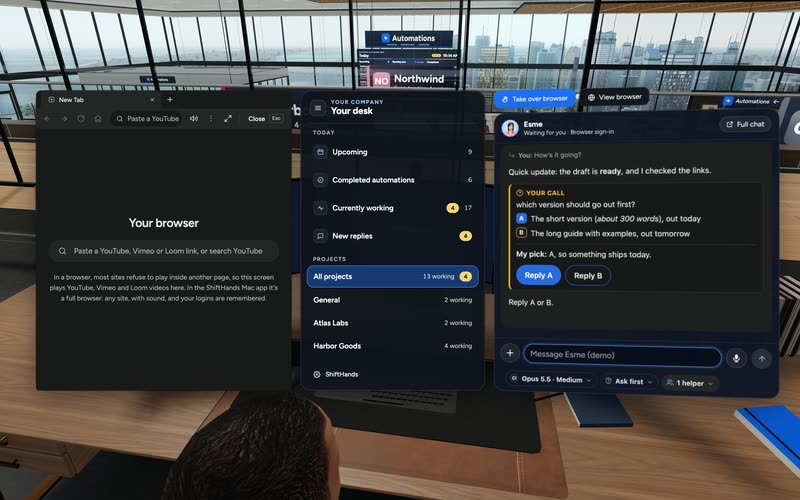
Sit down to see every project and every agent at a glance, and chat with anyone without leaving your chair.

Every agent has a desk in its project area. Agents running an automation head to the Automations room. Walk up to any agent and chat.
Rendered in the ShiftHands demo workspace with made-up names. Open the Virtual Environment from the sidebar or from Chief of Staff in the app. Agents still run on your Mac and use your connected AI accounts.
Sources
You decide what the agent reads. Give it the exact URLs and say what to pull from each one. It doesn’t discover competitors or websites on its own.
Start with three to five pages per competitor. Pages behind a login need you to sign in first, and some sites block automated visits. Respect each site’s terms.
Change checks
An agent can tell you what a page says today. To say what changed, it needs something to compare against: your notes, an earlier report or a dated copy of the page.
Ask the agent to save each report with the date and URLs it checked. Next week’s run can then compare the live pages with that saved report. Without a baseline, treat any “change” as something to verify, not a fact.
Example fields for a report the user can request from an agent, not a native ShiftHands reporting template.
Scheduled briefs
Attach a schedule to the research agent and it repeats the check on its own. Each run posts a result card in the agent’s chat, marked Done or Needs review.
Setting up your first recurring job? Learn how to schedule AI agent tasks.
Review and approvals
An agent can prepare a competitor briefing for you to review, but its findings are not automatically verified. Check important claims against the linked source pages, including the date and pricing context. ShiftHands can hold flagged commands for Allow once or Deny depending on the agent’s settings, but not every browser action or file change requires approval.
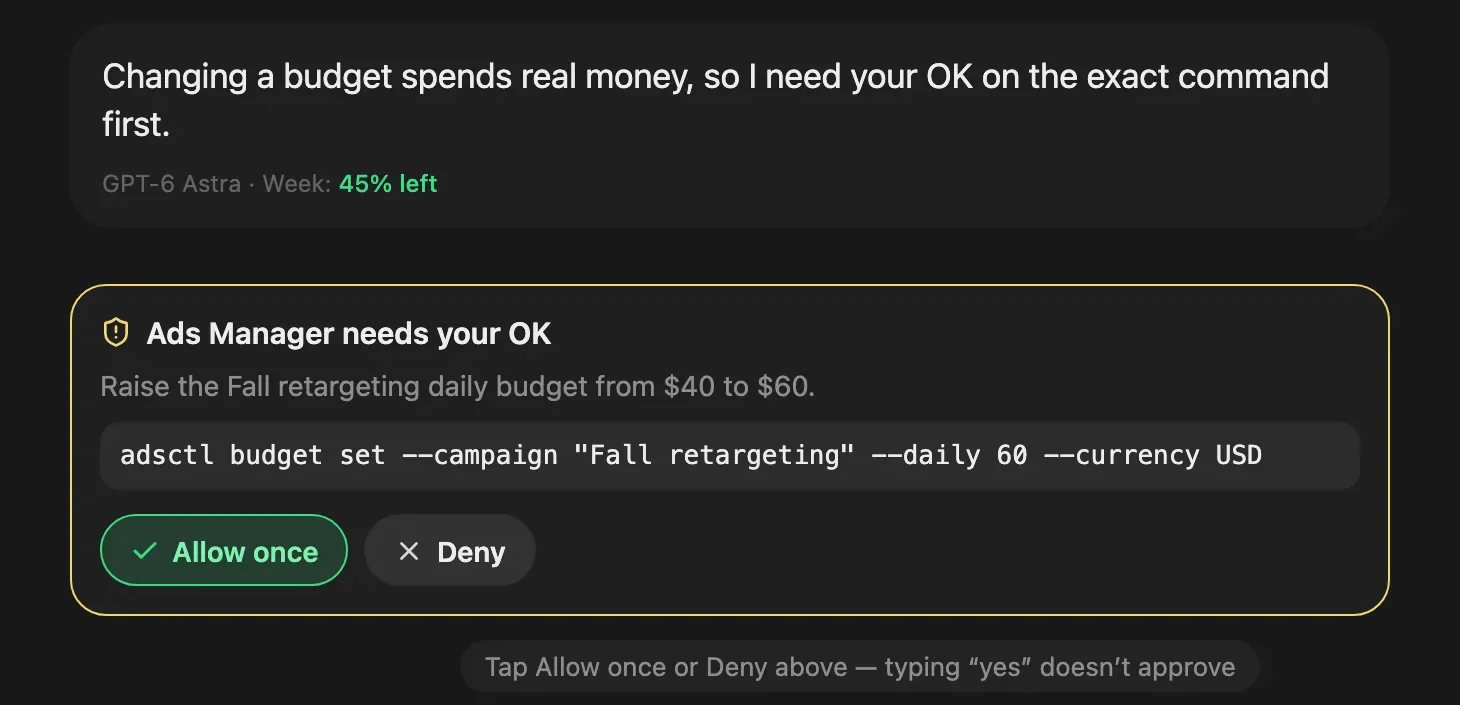
An approval card from the ShiftHands demo workspace, with made-up names.
Away from your desk? You can manage AI agents from your phone browser and read each briefing there.
Six steps. Start with one competitor and a small report you check by hand.
Use a compatible Apple-silicon Mac. See where ShiftHands agents run.
Sign in with Claude or ChatGPT, or add a supported API key.
For example, a Competitor research project with one Research Assistant.
Say exactly what to pull from each page.
Check the findings against those pages yourself.
Keep the dated report, then add a daily or weekly automation.
Install Ego Lite before browser research. It’s a free, separate Citro Labs download for macOS, with its own terms.
ShiftHands gives you a browser agent you direct and schedule. It is not a dedicated competitive-intelligence platform.
Included
Not included
Your ShiftHands plan sets the schedule limits. AI usage runs on the account you connect.
25 user messages a day, 1 project, 3 agents and 2 automations that run at most once a day.
No plan-level cap on messages, projects, agents or automations; fair use applies. Flexible schedules, including hourly.
Your connected provider’s pricing and limits apply. ShiftHands doesn’t sell model credits.
Needs an Apple-silicon Mac that stays on with ShiftHands open. Browser work needs Ego Lite.
Automation runs don’t count toward the Free message cap. Full details: ShiftHands pricing.
It suits people who need regular, checkable competitor research without a dedicated tool.
A good fit if
Look elsewhere if
Yes, on a schedule. A ShiftHands agent revisits the pages you name daily or weekly (hourly on Pro) and posts a report. It is not a continuous crawler.
Anything on the pages it can open: pricing, plan limits, features, changelogs, blog posts, documentation and homepage messaging.
It can compare today’s pricing page with a dated earlier report you keep. Without that baseline, any reported change needs checking by hand.
No. There is no built-in archive or diff engine. Ask the agent to save each dated report so the next run has something to compare against.
On Free, 2 automations at most once a day. On Pro, schedules can be hourly or every few hours. Your Mac must be on with ShiftHands open.
Only if you sign in. Use Take control to sign in in the agent’s browser, then Return to agent. Follow each site’s terms.
No. You get a result card after each scheduled run. ShiftHands doesn’t watch pages between runs or send instant change alerts.
Yes. Open ShiftHands in your phone’s browser to read result cards and reply to the agent. There is no native phone app.
It reads pages in a normal browser, one task at a time. It doesn’t do bulk scraping or get around bot blocks or CAPTCHAs.
Free is $0 with 2 daily automations. Pro is $49.99 a month or $499 a year. Your AI provider’s pricing applies on top.
Yes. Agents run on your own Apple-silicon Mac, not a cloud server. Keep it on with ShiftHands open for scheduled checks.
No. Pages can be blocked, change between runs or show different prices by region. Treat each briefing as a starting point and verify it.
Download the Mac app, create a research agent and give it three named competitor pages to check. Review its first report in chat.
Needs an Apple-silicon Mac (M1 or newer) with macOS 13 or later.
Screens and video come from the ShiftHands demo workspace with made-up names. Features and prices were checked on November 2, 2026 and can change.