

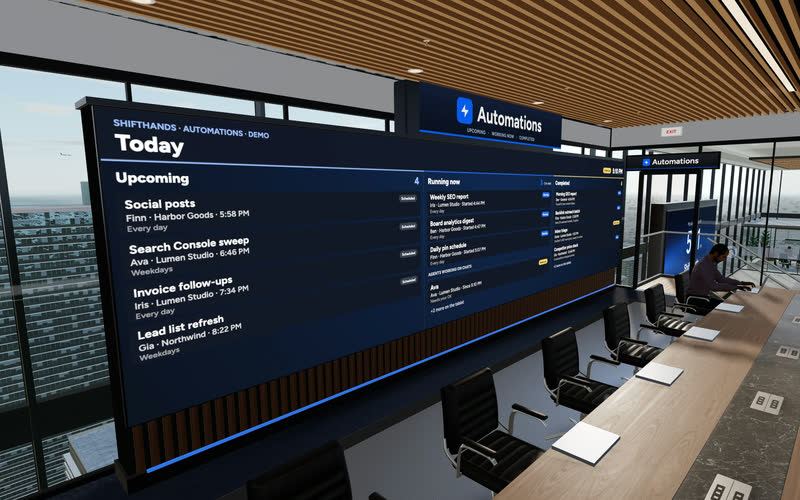
The Automations Wall
A big screen shows today’s Upcoming, Running now and Completed automations. Step up to the tablet to take a closer look at any run.
ShiftHands lets you organise AI agents around the work of running a startup. Give separate agents research, content, product and recurring tasks, then review their progress in one workspace. The agents run on your own Apple-silicon Mac, and you can check their work, chat and answer flagged commands from your phone browser.
ShiftHands is a Mac app for running and supervising a team of AI agents. The agents run on your own Apple-silicon Mac; you can monitor their work, chat with them and respond to flagged command approvals from the Mac app or a desktop or phone browser.
Hand each agent one clear job and the material it needs. Every task ends with something you can read and check.
“Review these five competitors and summarise positioning, pricing and gaps, with sources.”
Output: A research brief with source links.
“Review this repository and draft a plan for fixing these three reported bugs.”
Output: Proposed changes, plus code or test output where its tools allow.
“Review these pages and prepare a content-refresh brief for next week.”
Output: An editorial brief with suggested priorities.
“Review these support questions and draft replies without sending them.”
Output: Draft answers for you to review.
“Every Monday, review these project notes and prepare a summary of open tasks and blockers.”
Output: A scheduled result card in the project agent’s chat.
These are illustrative setups, not evidence of tested startup outcomes. Agents can only use the information, files and tools you give them.
For search work, see AI agents for SEO. For posts, see the AI agent for social media guide.
See it working
This is the real ShiftHands app with demo data. Open a chat to see an agent working through a task, or the Automations tab for scheduled runs and their result cards.
Recorded in the ShiftHands demo workspace.
Virtual Environment
Every ShiftHands plan, Free included, comes with the Virtual Environment: a 3D office in the app where your agents work at their desks, grouped by project. Walk over, pull up a chair, and watch your crew get it done.

A big screen shows today’s Upcoming, Running now and Completed automations. Step up to the tablet to take a closer look at any run.
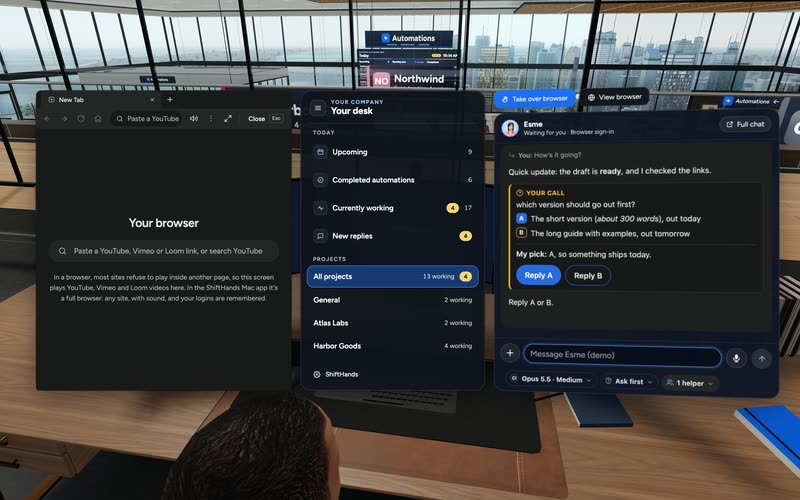
Sit down to see every project and every agent at a glance, and chat with anyone without leaving your chair.
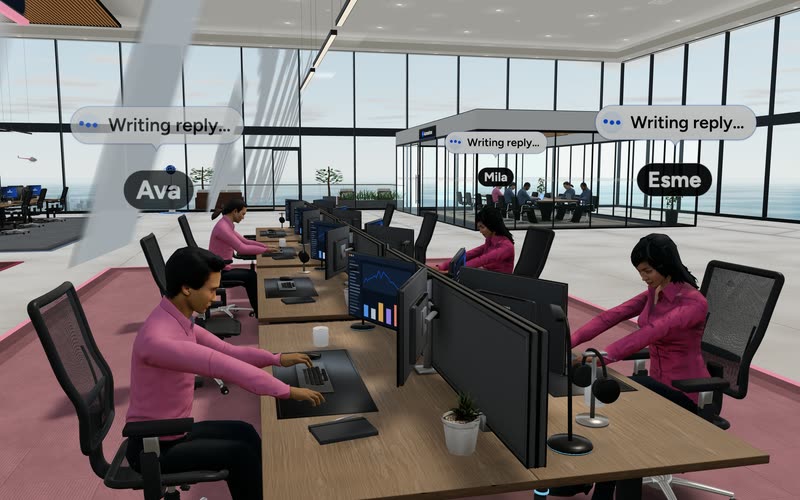
Every agent has a desk in its project area. Agents running an automation head to the Automations room. Walk up to any agent and chat.
Rendered in the ShiftHands demo workspace with made-up names. Open the Virtual Environment from the sidebar or from Chief of Staff in the app. Agents still run on your Mac and use your connected AI accounts.
Agent team
Create agents for the jobs you repeat. Name them however you like; ShiftHands has no prebuilt founder roles. Here is one example team.
Market and competitor investigation.
Shows: Source-backed research in chat.
Code and product tasks.
Shows: Project files or reviewable changes.
SEO briefs and draft copy.
Shows: Draft output and a scheduled result card.
Recurring checks and summaries.
Shows: Automation status and result history.
Example startup agent team in the ShiftHands demo workspace. Free supports one project and three agents; larger setups require Pro and remain subject to fair use, AI-provider limits and Mac capacity.
Want one screen for every agent’s status? See the ShiftHands AI agent dashboard.
Projects
A project groups related agents, such as everything for one product or one launch. Agents are the workers inside it.
Free includes one project and three agents. Pro removes the plan-level caps on projects and agents; fair use still applies.
Automations
Attach a schedule to an agent for daily reports, weekly summaries or recurring checks. Each run posts a result card in the agent’s chat.
Setting up your first recurring job? Learn how to schedule AI agent tasks.
Review and approvals
ShiftHands helps you review what your agents produce, but it does not enforce a universal founder-approval step before every action. Commands flagged under an agent’s settings wait for Allow once or Deny. Other actions may proceed without a prompt. For customer-facing messages, payments or publishing, use draft-only tasks and review the result before making the final decision.
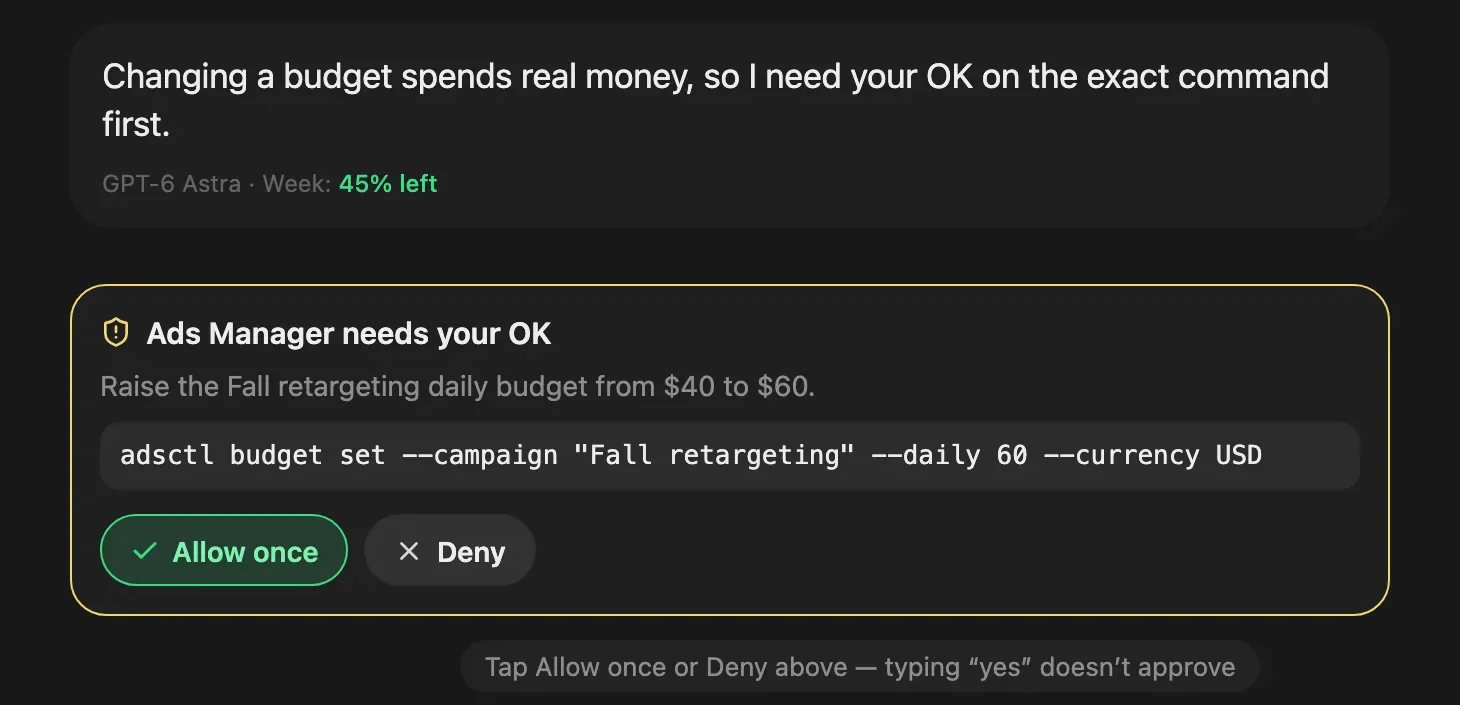
An approval card from the ShiftHands demo workspace, with made-up names.
Away from your desk? You can manage AI agents from your phone browser while the Mac does the work.
Six steps. Start with one project and one task before adding more agents.
Use an Apple-silicon Mac. See where ShiftHands agents run.
Sign in with Claude or ChatGPT, or add an API key.
Name it after your startup or product.
Give it one narrowly defined task.
Check the output and the agent’s permissions.
Then a daily or weekly automation, once the first workflow is useful.
Browser work needs Ego Lite, a free agent browser from Citro Labs. It’s a separate macOS download.
ShiftHands is a workspace for agents, not a business software suite. Here is what is and isn’t in the box.
Included
Not included
Your ShiftHands plan sets the limits. AI usage runs on the account you connect.
25 messages a day, 1 project, 3 agents and 2 automations that run at most once a day.
No plan-level cap on messages, projects, agents or automations; fair use applies. Adds hourly and every-few-hours schedules.
Your connected provider’s pricing and limits apply. ShiftHands doesn’t sell model credits.
Agents need an Apple-silicon Mac that stays on with ShiftHands open. Bigger teams need more Mac capacity.
Browser work depends on Ego Lite and on the sites your agents use. Full details: ShiftHands pricing.
It suits founders who want help with repeat work and are happy to direct and check it.
A good fit if
Look elsewhere if
Any you define. You name each agent and give it instructions, such as research, product, content or operations. There are no prebuilt roles.
No. They carry out the tasks you give them and report back. You set the goals and make the business decisions.
Free is $0 with 1 project, 3 agents and 25 messages a day. Pro is $49.99 a month or $499 a year. Your AI provider’s pricing applies on top.
No. Flagged commands wait for Allow once or Deny, depending on each agent’s settings. For messages, payments or publishing, keep tasks draft-only and review first.
Not natively. Agents work with the files and information you supply, and with sites they can use in their browser after you sign in.
On your own Apple-silicon Mac, which must stay on with ShiftHands open. Your connected AI provider handles the model. There is no native phone app; you check in from a phone browser.
We don’t promise either. It helps you hand off repeat work; results depend on your tasks and review.
Download the Mac app, create a project and give one agent a task you can review in chat.
Needs an Apple-silicon Mac (M1 or newer) with macOS 13 or later.
Screens and video come from the ShiftHands demo workspace with made-up names. Features and prices were checked on October 30, 2026 and can change.