

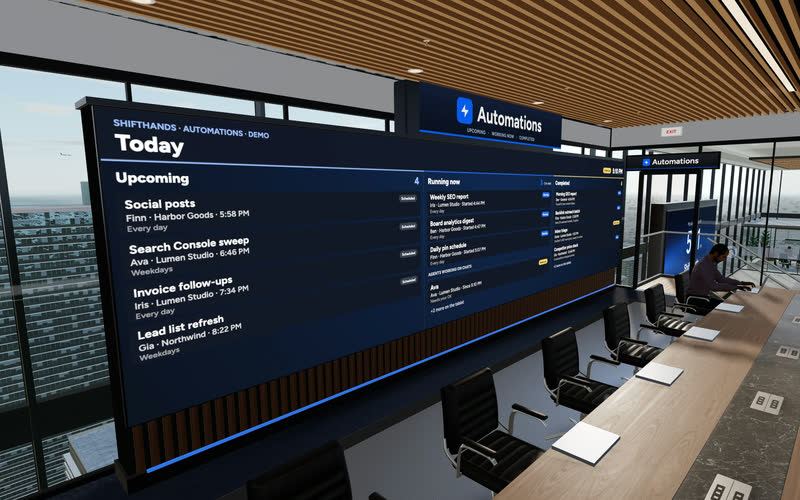
The Automations Wall
A big screen shows today’s Upcoming, Running now and Completed automations. Step up to the tablet to take a closer look at any run.
Conductor lets developers run Claude Code, Codex and other coding agents in parallel, with isolated workspaces, code review and cloud collaboration. After announcing that it was joining Meta, Conductor reversed its planned shutdown and continued developing the product. If you're comparing alternatives, the right choice depends on whether you need local coding worktrees, cloud sandboxes, Windows or Linux support, or a workspace for supervising AI agents beyond coding.
This guide covers the Conductor AI coding workspace at conductor.build, not the Conductor SEO platform or Netflix Conductor workflow orchestration software.
This guide is published by ShiftHands, one of the alternatives compared. We reviewed documented product features and pricing, not independent hands-on performance tests. ShiftHands is not a direct replacement for Conductor's Git worktree management, code review or cloud coding environments.
See it working
Click through the real app: projects down the side, a chat per agent, automations that report back, and a browser you can take over. The agents do the typing.
Recorded in the ShiftHands demo workspace.
Virtual Environment
Every ShiftHands plan, Free included, comes with the Virtual Environment: a 3D office in the app where your agents work at their desks, grouped by project. Walk over, pull up a chair, and watch your crew get it done.

A big screen shows today’s Upcoming, Running now and Completed automations. Step up to the tablet to take a closer look at any run.
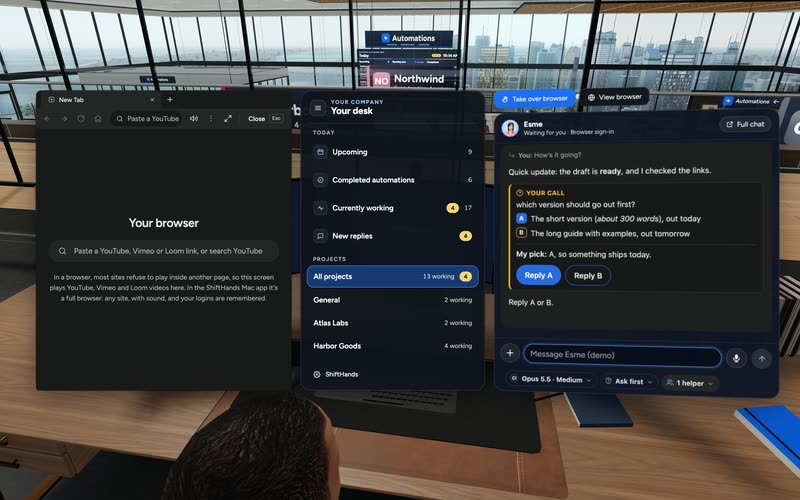
Sit down to see every project and every agent at a glance, and chat with anyone without leaving your chair.
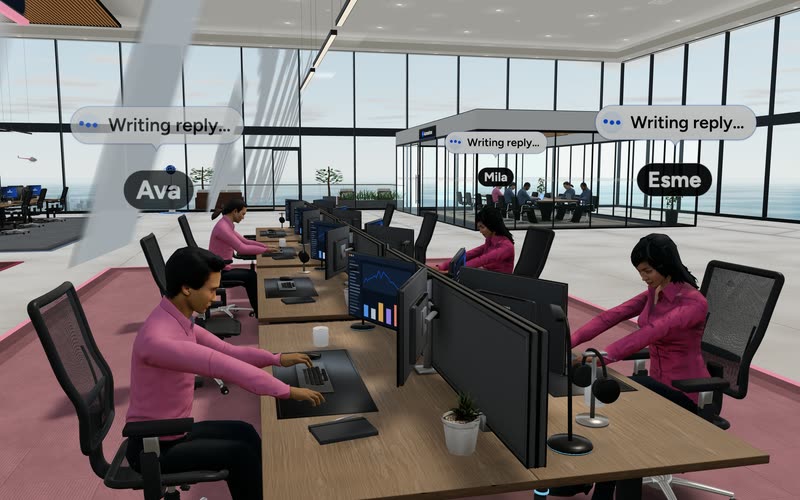
Every agent has a desk in its project area. Agents running an automation head to the Automations room. Walk up to any agent and chat.
Rendered in the ShiftHands demo workspace with made-up names. Open the Virtual Environment from the sidebar or from Chief of Staff in the app. Agents still run on your Mac and use your connected AI accounts.
The product you are comparing
Conductor announced that it was joining Meta in November 2026. Its original announcement included plans to wind down Conductor Cloud, but the company subsequently reversed those plans and confirmed that it would continue developing Conductor. As of November 27, 2026, its website still advertises cloud sandboxes, multiplayer workspaces and desktop, mobile and API access.
Sources: Conductor announcement, Conductor changelog, Conductor FAQ, Conductor Cloud FAQ, read November 27, 2026.
Each option suits a different reason for comparing Conductor, and each card names its main trade-off. ShiftHands appears first because it's our product, not because it's the closest replacement for Conductor. If your main reason for using Conductor is its worktree, diff review and pull-request workflow, evaluate Orca, Paradev or Emdash Classic before ShiftHands.
ShiftHands is a Mac app for running and supervising a team of AI agents. The agents run on your own Apple-silicon Mac; you can monitor their work, chat with them and respond to flagged command approvals from the Mac app or a desktop or phone browser.
Trade-off ShiftHands does not provide Conductor's automatic per-task Git worktrees, native diff review, pull-request management, multiplayer workspace sharing or cloud coding sandboxes. It is an alternative for supervising agent teams, not a direct replacement for Conductor's full development workflow.
Native browser workflows use the separate free Ego Lite browser from Citro Labs. Engine disclosure: ShiftHands uses MIT-licensed open-source Hermes Agent software by Nous Research. ShiftHands is a separate product and is not affiliated with or endorsed by Nous Research.
Source: ShiftHands' own download page and pricing, November 27, 2026.
Orca is an open-source agent IDE for running Claude Code, Codex and other coding agents in parallel, each in its own Git worktree. Orca Bots can take jobs from Slack, Linear or GitHub, and you step in when they need you.
Trade-off Primarily a developer environment rather than a general operations workspace.
Sources: Orca, Orca mobile docs and Orca on GitHub, checked November 27, 2026.
Paradev, formerly Superset, is an open-source workspace for Claude Code, Codex and other agents, locally or in the cloud. It runs agents in Git worktrees, and paid plans add remote access, automations and cloud workspaces.
Trade-off Remote access and hosted cloud workspaces require appropriate paid plans. Cloud workspaces start on Team, not Pro, and cloud usage is metered rather than unlimited.
Sources: Paradev pricing, Paradev download and Paradev on GitHub, checked November 27, 2026.
Emdash Classic is the open-source desktop app for running coding agents in parallel. It runs Claude Code, Codex, OpenCode and more in separate Git worktrees, on your machine or over SSH.
Trade-off Classic receives fixes, but new development focuses on Emdash 2.0. Emdash 2.0 is a separate team product in early access, and its cloud and team controls are not part of Classic.
Sources: Emdash and Emdash Classic on GitHub, checked November 27, 2026.
Nimbalyst is an open-source visual workspace for Claude Code, Codex, OpenCode and Copilot agents. It combines an agent-powered tracker and task management with a code editor, terminal, Git worktrees and visual editors for docs, mockups and diagrams.
Trade-off Collaborative team features are still in beta.
Sources: Nimbalyst and Nimbalyst pricing, checked November 27, 2026.
Paseo runs many coding agents at once, on any machine, from your desk or your phone. A local server called the daemon manages your agents, and the desktop, mobile, web and CLI clients connect to it.
Trade-off Requires configuring and maintaining the machines running your agents. Its privacy and encryption statements are Paseo's own, not an independent audit.
Sources: Paseo, Paseo download and Paseo on GitHub, checked November 27, 2026.
| Tool | Best for | Desktop platforms | Where agents run | Coding workflow | Remote access | Team collaboration | Pricing / free option |
|---|---|---|---|---|---|---|---|
| Conductor (reference) | Parallel coding agents, local or cloud | macOS | Local Mac or managed cloud sandboxes | Workspaces, worktrees, diffs and PRs | Mobile and API advertised | Multiplayer workspaces, plan-dependent | Local tool described as free; cloud prices not verified |
| ShiftHands | Mac-hosted agent teams beyond coding | Apple-silicon Mac | Your own Apple-silicon Mac | Project agents and parallel helpers; no native worktree/PR loop | Desktop or phone browser | No multiplayer workspaces | Free; Pro $49.99/month |
| Orca | Cross-platform coding-agent workspaces | macOS, Windows, Linux | Local machines, SSH hosts, remote servers or configured cloud VMs | Worktrees, diff review and Git integration | Native iOS/Android companion, beta | Task handoffs through Slack, Linear or GitHub; live multiplayer workspaces not verified. | Free, MIT-licensed |
| Paradev | Local and cloud agent workspaces | macOS; Linux experimental | Local workspaces or paid cloud workspaces | Worktrees, change review and PRs | Remote and mobile features on Pro and above | Paid plans for multiple users | Free local; Pro from $16/user/month annually; Team from $54 annually |
| Emdash Classic | Open-source worktrees and PR review | macOS, Windows, Linux | Local machine or SSH host | Worktrees, diffs, PRs and merge | Remote machines through desktop/SSH | Not documented for Classic | Free, open-source desktop software |
| Nimbalyst | Coding agents plus visual task management | macOS, Windows, Linux | Your development environment | Worktrees, editor and task tracking | Native mobile session management | Teams plan in beta | Individual $0; Teams free during beta |
| Paseo | Remote control of agents on your machines | macOS, Windows, Linux | User-controlled machine or server | Worktrees, editor, diffs and PRs | Desktop, web, native iOS/Android and CLI | Not documented as shared workspaces | Open source, Apache-2.0 |
Remote access and cloud hosting are different capabilities. A mobile app may let you supervise an agent running on your computer, while a managed cloud workspace runs the development environment on separate infrastructure. Check where the agent executes, what happens when your computer is switched off and which plan includes the features you need. Facts were read on each product's own pages on November 27, 2026.
Conductor's desktop app is macOS-only. Orca, Emdash Classic and Nimbalyst run on macOS, Windows and Linux.
Orca, Paradev, Emdash Classic and Paseo publish their source code under open-source licences.
Paradev includes cloud workspaces from its Team plan. Orca can run agents on cloud VMs you configure.
Paseo, Orca and ShiftHands let you check on agents running on your own machines from a phone.
ShiftHands runs project agents for research, SEO, content and operations as well as coding. The Meta announcement is also a fair prompt to review your roadmap requirements, not evidence that Conductor will disappear.
Conductor and ShiftHands suit different set-ups. Here is where each one makes more sense.
Stay on Conductor when
Conductor may still be the better choice if its coding workflow already meets your needs. It continues to offer parallel coding agents, isolated workspaces, diff review, pull-request management and cloud development environments.
If your team relies on its multiplayer workspaces, managed cloud sandboxes or existing Claude Code, Codex, Cursor and OpenCode workflows, there may be no reason to migrate simply because Conductor is joining Meta. The company reversed its planned shutdown and has continued releasing updates.
Trade-off: Check current cloud-plan availability, future compute pricing and the product roadmap before committing to a workflow that depends on hosted infrastructure. Local users should also understand the permissions granted to coding agents on their machines.
ShiftHands fits better when
To see what your Mac needs, read where ShiftHands agents run.
Start with Orca: parallel agents in worktrees with diff review on macOS, Windows and Linux.
Start with Paradev: free local workspaces, with cloud workspaces from its Team plan.
Start with Emdash Classic: worktrees, diffs, pull requests, CI checks and merge in one app.
Start with Nimbalyst: an agent-powered tracker, code editor and visual editors in one free app.
Start with Paseo: a daemon on your machine with desktop, web, mobile and CLI clients.
Start with ShiftHands: project agents, scheduled work and phone-browser supervision on your own Mac.
Stay on Conductor, and recheck its cloud plans and pricing as they change.
It depends on the job. Orca suits cross-platform worktree coding, Paradev suits local plus managed cloud workspaces, Emdash Classic suits open-source PR review, Nimbalyst suits visual task management, Paseo suits remote control of your own machines, and ShiftHands suits Mac-hosted agent teams beyond coding.
No. Conductor announced it was joining Meta in November 2026 and first planned to wind down Conductor Cloud, then reversed that plan. It says it will keep developing Conductor, and its changelog shows new releases since.
Not as of November 27, 2026. The original plan to wind down Conductor Cloud was reversed, and its site still advertises cloud sandboxes. Its Cloud FAQ lists access on Pro, Teams and Enterprise plans.
Conductor announced it was joining Meta, then reversed its planned shutdown and kept shipping. Its footer now reads Conductor from Meta, and it has released features such as multi-repo workspaces since.
Conductor's general FAQ describes its local coding tool as free. Cloud access sits on Pro, Teams and Enterprise plans, and we could not verify current public prices on November 27, 2026. It plans usage-based cloud pricing, and your AI-provider costs are separate.
Yes. Orca and Emdash Classic offer free open-source desktop software, Paseo offers free open-source software, Paradev and Nimbalyst have $0 plans, and ShiftHands has a Free plan with 25 user messages a day. AI-model and infrastructure costs depend on the tool and configuration.
Yes. Orca and Nimbalyst are MIT-licensed, Emdash Classic and Paseo are Apache-2.0, and Paradev is open source under MIT. ShiftHands uses the open-source Hermes Agent engine but is a separate product.
Orca, Emdash Classic, Nimbalyst and Paseo run on macOS, Windows and Linux. Paradev runs on macOS with an experimental Linux build. ShiftHands needs an Apple-silicon Mac.
All six. Orca, Paradev, Emdash Classic, Nimbalyst and Paseo run Claude Code and Codex agents, and ShiftHands lets you sign in with Claude (through Claude Code) or ChatGPT (through Codex).
All six run more than one agent at a time. Orca, Paradev, Emdash Classic and Paseo give each task its own Git worktree, and ShiftHands runs project agents with parallel helpers.
Orca, Paradev, Emdash Classic, Nimbalyst and Paseo document Git worktrees. ShiftHands does not create automatic per-task worktrees.
Emdash Classic lets you review diffs, create pull requests, check CI and merge. Orca, Paradev and Paseo show diffs and support commits and pull requests, and Nimbalyst lets you approve AI changes. ShiftHands has no built-in diff review or pull-request screen.
Paradev offers managed cloud workspaces from its Team plan, with metered hours. Orca can run agents on cloud VMs you configure, and Paseo and Emdash Classic run on servers you control. ShiftHands runs agents on your own Mac.
Yes, with several tools. Orca has a beta mobile companion, Paradev and Nimbalyst have mobile apps, Paseo has iOS and Android apps, Conductor lists iOS, and ShiftHands works from any phone browser.
Conductor offers multiplayer workspaces. Paradev has paid plans for multiple users, and Nimbalyst Teams adds collaboration in beta. ShiftHands does not offer live multiplayer coding workspaces.
Conductor documents exporting account data under Settings, Account, Export data, and moving cloud workspaces to your machine with Transfer to local. We have not verified a tool that imports that data into any alternative.
No. ShiftHands has no automatic per-task worktrees, native diff review, pull-request management, multiplayer workspaces or cloud sandboxes. It fits people who want Mac-hosted agent teams for coding and other work, scheduled and supervised from a phone.
If its local or cloud workflow does what you need, there may be no reason to move. Recheck its cloud plans, future compute pricing and roadmap, and switch if you need Windows or Linux, open source or a different hosting model.
Run project agents and scheduled work on your own Apple-silicon Mac, and supervise them from any browser. There are no per-task worktrees, pull-request screens or cloud sandboxes, so pick a coding workspace above if you need those. The free plan needs no card. See ShiftHands pricing.
Every fact on this page comes from the product's own site or repository, read on November 27, 2026. We did not run hands-on performance tests.
Engine disclosure: ShiftHands uses MIT-licensed open-source Hermes Agent software by Nous Research. ShiftHands is a separate product and is not affiliated with or endorsed by Nous Research.
Product names belong to their owners. ShiftHands is not affiliated with or endorsed by Conductor, Meta, Orca, Paradev, Emdash, Nimbalyst, Paseo or Nous Research. Facts and prices were checked on each product's own site on November 27, 2026 and can change.