


The Automations Wall
A big screen shows today’s Upcoming, Running now and Completed automations. Step up to the tablet to take a closer look at any run.
ShiftHands lets you use an AI agent to enter information into web forms from your own Mac. Give it a spreadsheet, file or other source of data, then have it work through the fields in a live browser you can watch. Take control when needed and check the entered values before saving or submitting.
ShiftHands is a Mac app for running and supervising a team of AI agents. The agents run on your own Apple-silicon Mac; you can monitor their work, chat with them and respond to flagged command approvals from the Mac app or a desktop or phone browser.
Each job has three parts: the data you supply, the web form it goes into and a result you check. Start small, with records you can verify by eye.
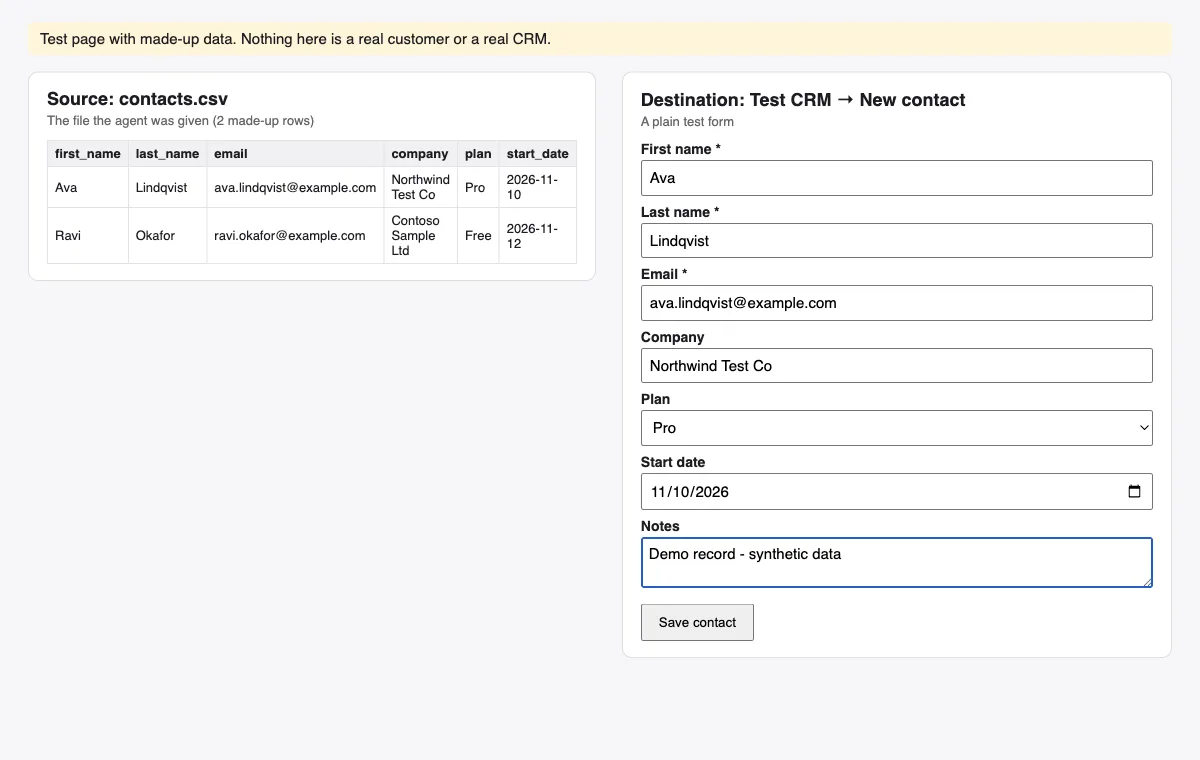
“Use this sample customer row to fill the corresponding fields in this test form. Leave it for me to check.”
Result: A populated form with the values ready for review.
“Read these approved fields from the source record and enter them into the destination form.”
Result: A destination record checked against the source.
“Use this supplied product information to update the fields in this supplier portal.”
Result: Proposed changes or a completed entry to verify.
“Use these five approved contact details to populate the relevant fields in our web app, one at a time.”
Result: Individual records checked for accuracy and duplicates.
“Every Monday, review these records and prepare the next data-entry task.”
Result: A scheduled result card identifying work and exceptions.
These are illustrative configurations, not documented tests of all five workflows. Results depend on the site, the model you connect and how clear your instructions are.
See it working
This is the real ShiftHands app with demo data. Click Browser to see an agent hand you its browser for a verification step, then take it back. Names and tasks are made up.
Recorded in the ShiftHands demo workspace.
Virtual Environment
Every ShiftHands plan, Free included, comes with the Virtual Environment: a 3D office in the app where your agents work at their desks, grouped by project. Walk over, pull up a chair, and watch your crew get it done.

A big screen shows today’s Upcoming, Running now and Completed automations. Step up to the tablet to take a closer look at any run.
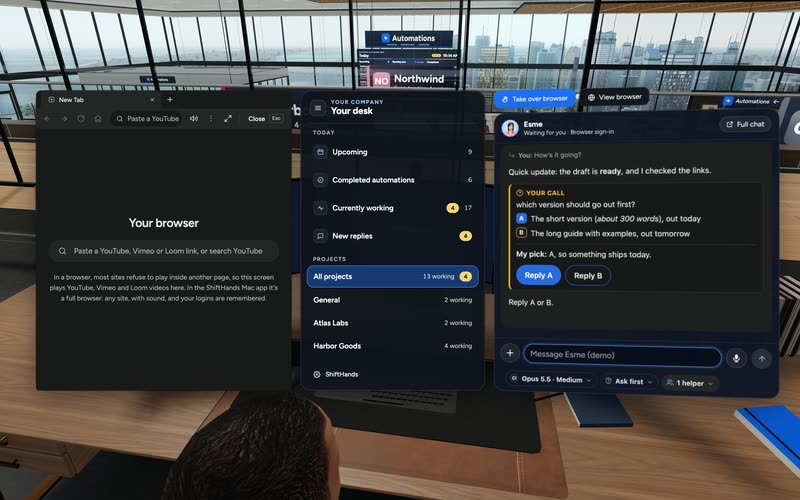
Sit down to see every project and every agent at a glance, and chat with anyone without leaving your chair.

Every agent has a desk in its project area. Agents running an automation head to the Automations room. Walk up to any agent and chat.
Rendered in the ShiftHands demo workspace with made-up names. Open the Virtual Environment from the sidebar or from Chief of Staff in the app. Agents still run on your Mac and use your connected AI accounts.
Source and destination
You give the agent the data and tell it where each value goes. It reads the source, opens the destination form and types the values in. There are no built-in connectors in between.
ShiftHands doesn’t connect natively to Google Sheets, Excel, Airtable or any CRM. The agent works with what it can open in its browser or read from files you share.
Form filling
With Ego Lite installed, agents can browse, click and fill in forms while you watch. They work on websites you’re already signed in to in that browser.
In our separate Ego Lite browser automation test, an AI agent filled text, email, dropdown and date fields in a local test form. This was not a ShiftHands project-agent test. Complex widgets, multi-page forms and file uploads vary by site, so test your own workflow with one non-sensitive record first.
For everything else an agent can do on your computer, see our guide to an AI agent for Mac.
Product listings
A browser-based data entry agent can also help prepare individual product listings. Give it product details you already have, ask for a draft title and description, then have it enter the approved information into an accessible seller form.
For example, a seller could supply a product name, dimensions, material, condition and price, then ask the agent to:
Check before publishing: Verify the product’s specifications, condition, category, price, shipping terms and any required disclosures. An AI-generated description can contain inaccurate claims, and an instruction to leave a listing unpublished is not a guaranteed software-enforced checkpoint.
ShiftHands does not include native Shopify, eBay, Etsy or WooCommerce integrations, marketplace APIs, bulk product feeds, inventory synchronisation or image generation. Browser access depends on the seller platform, account permissions and automation rules.
Start with one non-sensitive test product and review the result before attempting additional listings.
Review and accuracy
Check each record before it counts. This is the review we recommend for every entry.
A recommended human validation checklist, not a native ShiftHands data-validation engine.
An agent can fill web forms using information you provide, but ShiftHands does not guarantee that every field is correct or every submission waits for approval. Flagged commands may require Allow once or Deny depending on the agent’s settings; ordinary browser clicks and form submissions are not necessarily gated. For important records, instruct the agent to stop before submission where possible, inspect the entered values yourself and submit manually.
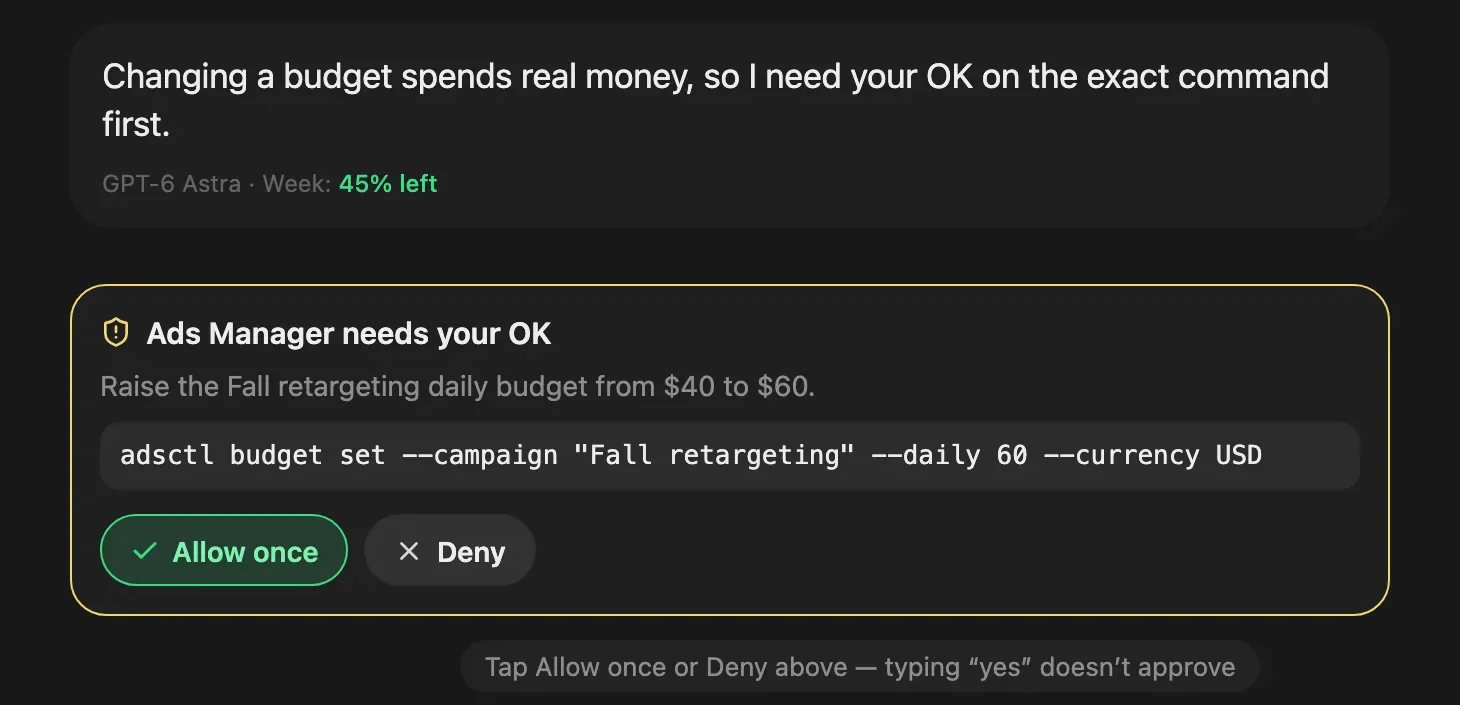
A flagged-command approval card from the ShiftHands demo workspace, with made-up names.
To watch several agents and their results in one place, see the AI agent dashboard.
Browser control
Some steps are yours. An agent can hand you its browser for a step like a sign-in, or you can press Take control. While you’re in control the agent is paused; press Return to agent when you’re done. For other checkpoints, tell the agent to stop and ask you.
Away from your desk? You can manage AI agents from your phone browser to check progress and reply.
Six steps. Start with one test record and review it by hand.
Use a compatible Apple-silicon Mac. See where ShiftHands agents run.
Connect Claude, ChatGPT or a supported API-key provider.
Install Ego Lite, then create a Data Entry project and agent.
Use a small, non-sensitive record and an accessible destination form.
Ask it to populate the fields, without submitting, and watch the live browser.
Check the values and correct any mistakes before another record or a recurring task.
There is no spreadsheet-to-form wizard or field-mapping template. Your instructions are the mapping, so name each column and field.
Scheduling
Yes, as scheduled agent tasks. Each run posts a result card in the agent’s chat, marked Done or Needs review. It is not a validated bulk-import or guaranteed record-processing queue.
Setting up your first recurring job? Learn how to schedule AI agent tasks.
ShiftHands gives you a browser agent you direct and supervise. It is not a dedicated data-entry or document-extraction platform.
Included
Not included
Your ShiftHands plan sets the limits. AI usage runs on the account you connect.
25 user messages a day, 1 project, 3 agents and 2 automations that run at most once a day.
No plan-level cap on messages, projects, agents or automations; fair use applies. Flexible schedules, including hourly.
Your connected provider’s pricing and usage limits apply. ShiftHands doesn’t sell model credits.
Needs an Apple-silicon Mac that stays on with ShiftHands open, plus Ego Lite for browser work.
Automation runs don’t count toward the Free message limit. Provider usage limits and Mac capacity apply. Full details: ShiftHands pricing.
It suits small, reviewable entry work in web apps you can open yourself.
A good fit if
Look elsewhere if
Yes, in accessible forms. With Ego Lite, a ShiftHands agent clicks and types into fields while you watch. Some sites’ widgets or protections won’t work.
Yes, from a file you share, such as a CSV export. The agent works one row at a time. Check each record before it’s saved.
No. There are no native spreadsheet integrations. Export the rows to a file, or open the sheet in the agent’s browser for it to read.
Often, if you can sign in and the form works in a normal browser. You sign in yourself; results vary by site.
There is no accuracy guarantee. Agents can misread values, swap fields or create duplicates, so review every important record.
No. Flagged commands can wait for Allow once or Deny, depending on settings. Ordinary clicks and submissions aren’t necessarily gated.
Not automatically. You can ask the agent to search the destination first, but there is no built-in duplicate checker.
It has no OCR or extraction pipeline. An agent may read text files you share, but don’t rely on it for scans or handwriting.
You handle it. Press Take control, sign in or complete the check, then Return to agent. It doesn’t get around CAPTCHAs.
Yes, as scheduled agent tasks. Free allows 2 at most daily; Pro allows hourly. It isn’t a bulk-import queue.
Yes. Open ShiftHands in your phone’s browser to read results and reply. The work itself runs on your Mac.
Start with made-up data. Real records go to your connected AI provider, so consider privacy, confidentiality and any rules that apply.
ShiftHands Free is $0; Pro is $49.99 a month or $499 a year. Your AI provider’s pricing applies on top.
Yes. Agents run on your Apple-silicon Mac, not a cloud server. Keep it on with ShiftHands open.
Download the Mac app, create a data entry agent and give it one made-up record to enter. Inspect the result before you scale up.
Needs an Apple-silicon Mac (M1 or newer) with macOS 13 or later and 8 GB of memory.
Screens and video come from the ShiftHands demo workspace with made-up names. The form demo uses synthetic data on a test page. Features and prices were checked on November 3, 2026 and can change.